<?xml version="1.0" encoding="utf-8"?>
<feed xmlns="http://www.w3.org/2005/Atom">

  <title><![CDATA[|grepLinux]]></title>
  <link href="http://greplinux.com/atom.xml" rel="self"/>
  <link href="http://greplinux.com/"/>
  <updated>2014-03-07T19:22:13-06:00</updated>
  <id>http://greplinux.com/</id>
  <author>
    <name><![CDATA[Isaac Velando]]></name>
    
  </author>
  <generator uri="http://octopress.org/">Octopress</generator>

  
  <entry>
    <title type="html"><![CDATA[What's Different About Linux: Programs]]></title>
    <link href="http://greplinux.com/blog/2014/02/23/whats-different-about-linux-programs/"/>
    <updated>2014-02-23T21:47:44-06:00</updated>
    <id>http://greplinux.com/blog/2014/02/23/whats-different-about-linux-programs</id>
    <content type="html"><![CDATA[<h2>Briefly: Software Culture Shock</h2>

<p>Starting with Linux can be daunting for longtime Windows or Mac OS X users, and just about everyone who has tried out Linux has had to adjust to the fact that you&rsquo;re not meant to manage software like you&rsquo;re used to. This often winds up frustrating users who try to reuse their tried-and-true methods in Linux which often leads to a poor user experience. However, if a new user is willing to learn the basics of how package management works in Linux, they&rsquo;ll discover the greatest immediate usability improvement that Linux-based operating systems offer compared to their counterparts.</p>

<p>Keep reading for a detailed look at how software management differs on Linux and what users can expect in practical use.<!--more--></p>

<h2>Breaking Expectations</h2>

<h3>Managing Software on Windows</h3>

<p>Windows users are accustomed to downloading a .exe or .msi file from the internet or a CD and running a setup wizard. This results in a new shortcut icon on the desktop and in the start menu, and uninstalling is usually performed either through the control panel or by a start menu entry. As of Windows 8 it seems that the future is moving toward an app store paradigm for managing software, but Windows is likely to retain the current methods for decades to come.</p>

<p>For upgrades, Windows users either rely on the application to automatically check for upgrades or they&rsquo;ll have to manually check online for upgrades and reinstall that way. System upgrades are done through the Windows Update tool and notoriously frequently require a system restart. The hassle this process poses tends to leave Windows users with a large amount of out-of-date software which may have known security holes.</p>

<!--From experience I know of several users who consciously ignore Java and Windows updates because of how annoying the process can be, and of course these are two of the most commonly attacked pieces of software that really need to be kept up to date and patched.-->


<h3>Managing Software on Mac OS X</h3>

<p>Mac OS X users typically either install software from the Mac Store which shows up in the Applications menu or download a .dmg file which typically asks the user to drag and drop a shortcut to the Applications folder. Uninstalling applications is accomplished by dragging the application icon to Trash.</p>

<p>The upgrade situation for Mac OS X users is similar to Windows except that applications installed through the App Store are more readily upgraded automatically. Software installed manually through a .dmg file still needs to either check for updates by itself or be manually checked by the user just like Windows software installed by a .exe or .msi file. System upgrades are, like Windows with Microsoft, issued at the discretion of Apple and are issued separately from other software.</p>

<h2>Linux: Enter Package Management</h2>

<p>With very little exception, none of these paradigms describe managing software in Linux. Linux employs <strong>package managers</strong> do manage <em>all</em> software including system software (the Linux kernel, the bootloader, etc), software libraries (required for other software to function), and user applications (such as the VLC media player or the Firefox web browser). These packages are stored in <strong>repositories</strong> (repos) which are shipped with the distribution you install and can be changed. Package management is often touted by Linux users as one of the best reasons for using the platform if it otherwise suits one&rsquo;s needs; what we&rsquo;ll discover is a system that offers the following:</p>

<ul>
<li>All software installed with a package manager can be simultaneously upgraded with a single command or button click</li>
<li>As long as you can trust the distribution&rsquo;s repositories, all software you install is trustworthy (you can also choose to download the source code with package manager if that&rsquo;s of interest)</li>
<li>Installing, upgrading, and uninstalling is all handled through the same interface</li>
<li>Particularly when using the command-line interfaces, installing software is predictable and can be automated; this makes setting up a fresh Linux install doable with a single script</li>
<li>The only software upgrades that require a reboot to take advantage of are Linux kernel updates, and if one is using a long term support stable type of distribution these are probably infrequent</li>
</ul>


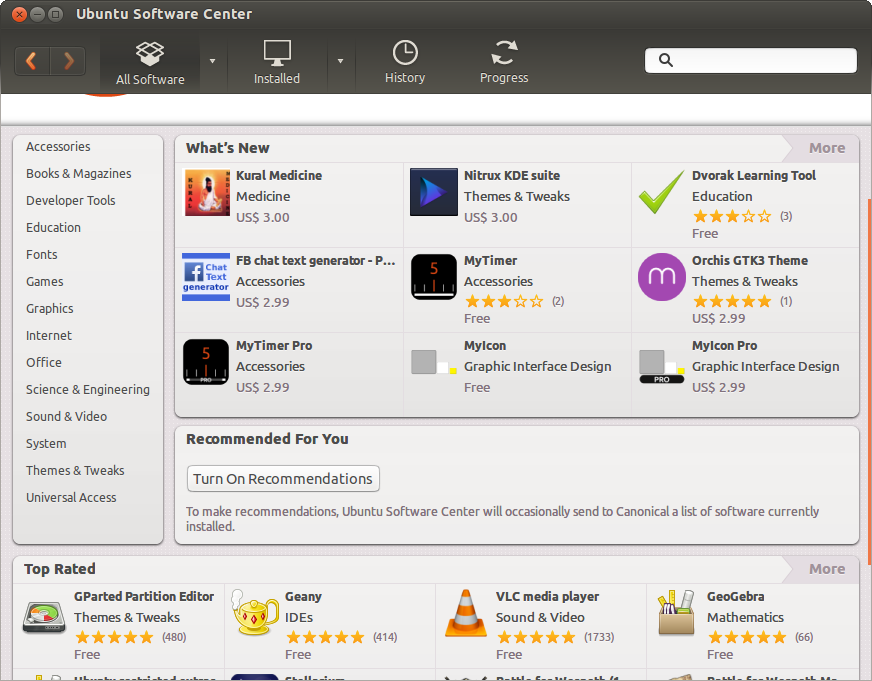
<p>At their core, the package managers come in the form of command-line applications accessed from the terminal, and experienced Linux users often gravitate toward accessing them in this manner, but there are also numerous graphical interfaces for these package managers that are more accessible to the average user. For example, Ubuntu features the Ubuntu Software Center (pictured below) which uses the app store paradigm but is really just an interface for accessing packages in Ubuntu&rsquo;s repositories using the <em>apt</em> package manager. There are lower-level graphical frontends like Synaptic that offer a lot of useful features but are slightly less user friendly than say the Ubuntu Software Center. As is generally the case, Linux never fails to offer vast freedom of choice.</p>

<p><img src="http://greplinux.com/images/ubuntu-software-center-main.png" title="Ubuntu Software Center Main Screen" alt="Ubuntu Software Center main screen showing categories, new software, and top rated software"></p>

<h2>Using Package Managers</h2>

<p>I&rsquo;ll focus on Ubuntu for the following examples due to the distribution&rsquo;s market share and popularity among new users; the command-line instructions are common to Debian-based (and Ubuntu-based) distributions, and other package managers like yum and pacman function similarly on the command line. Also I&rsquo;ll generally be foregoing exhaustive details; other easily Googleable guides do a great job of this for covering advanced functionality.</p>

<h3>Graphical Package Managers</h3>

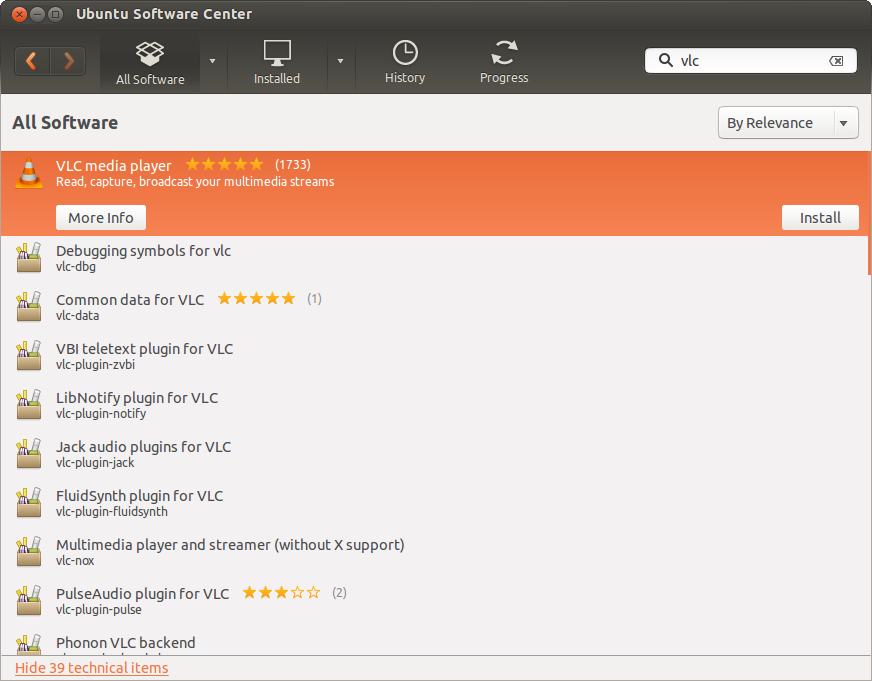
<p>As noted above, graphical package managers on Linux such as the Ubuntu Software Center are trending toward the app store paradigm. You open up the interface, you are presented with a category list and/or a featured app list, and you may either browse the categories or search for software. For instance, the following Ubuntu Software Center screenshot shows sample search results for &ldquo;vlc&rdquo; which is a popular cross-platform video and audio player. This allows for a more familiar and user-friendly experience.</p>

<p><img src="http://greplinux.com/images/ubuntu-software-center-search.png" title="Ubuntu Software Center Search Results" alt="Ubuntu Software Center search results for the VLC media player"></p>

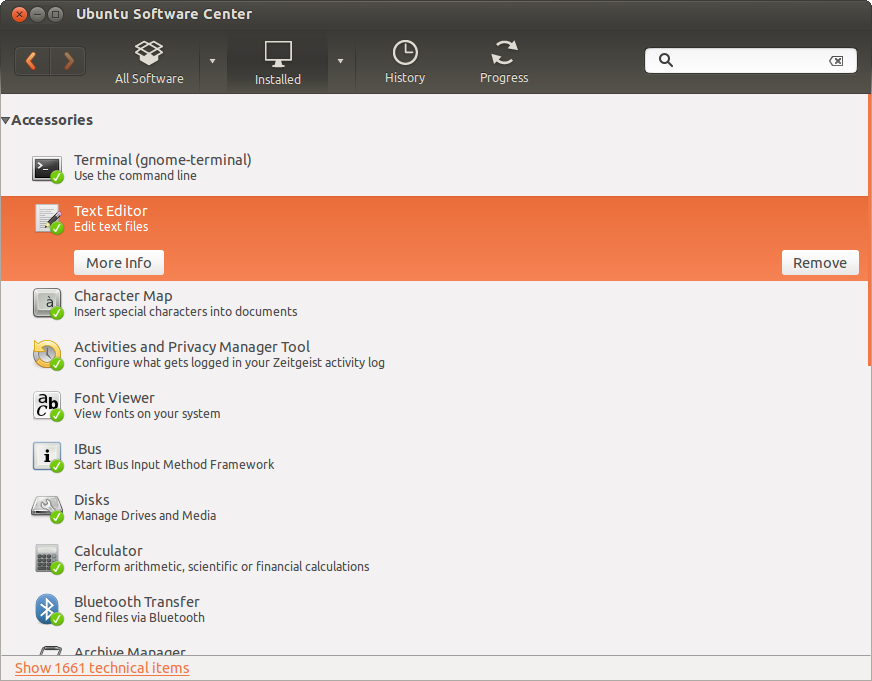
<p>The Ubuntu Software Center, like most of its alternatives, allows the user to browse installed packages and remove items:</p>

<p><img src="http://greplinux.com/images/ubuntu-software-center-installed.png" title="Ubuntu Software Center Installed Packages" alt="Ubuntu Software Center installed packages screen showing the option to remove a text editor"></p>

<p>Searching is equivalent to searching through the repositories your package manager is configured to use; Ubuntu Software Center for example will use the <em>apt</em> package manager which, as with most things Linux, is also accessible via the command line. If a user chooses to add another repository, software found in this repository will become searchable in the graphical package manager.</p>

<p>The primary difference between using a Linux graphical package manager and, say, the Mac OS X App Store is that because of the all-reaching nature of Linux package managers and repositories, literally <em>all</em> system software is centralized in this graphical interface. That is, not only are <em>user applications</em> available but also core <em>system</em> software and libraries are available: the Linux kernel itself, bootloaders, and software libraries are all available to browse and install in addition to user applications like the VLC media player or the GIMP image editor. Again: in Linux all software is centralized rather than having a gap between system and user software.</p>

<h3>Terminal Interface Package Managers</h3>

<p>As is often the case with Linux, everything you can do in a graphical interface can be accomplished using command-line tools in the terminal; many experienced users find a high level of comfort and enhanced efficiency when working in the terminal. I&rsquo;ll try and help illustrate how this can be the case by showing the basic functionality of the <em>apt</em> package manager.</p>

<p>First, one typically updates their package list by syncing with the repositories (other package managers bake this functionality in with other commands):</p>

<pre><code>sudo apt-get update
</code></pre>

<p><img src="http://greplinux.com/images/ubuntu-terminal-apt-get-update.png" title="Ubuntu Terminal apt-get update" alt="Ubuntu Terminal showing sample output from the sudo apt-get update command"></p>

<p>Notice that a lot of package management actions require root privileges which is why <code>sudo</code> was used here. In the sample output above the lines like <code>saucy-backports/multiverse</code> is an example of an Ubuntu repository. Now let&rsquo;s look at probably the four most common <em>apt</em> functions:</p>

<ul>
<li><p>Upgrade all installed packages</p>

<pre><code>sudo apt-get upgrade
</code></pre></li>
</ul>


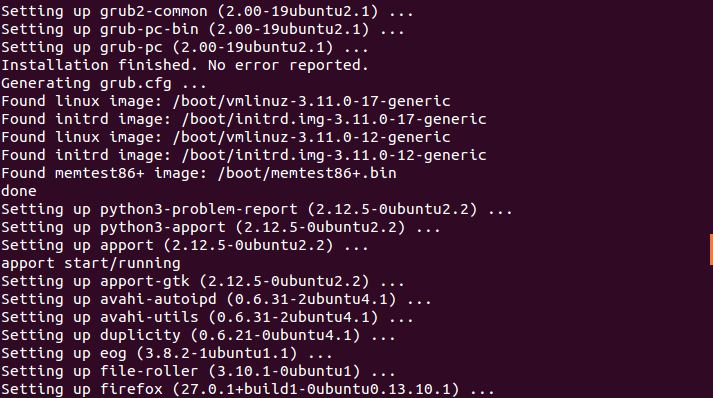
<p><img src="http://greplinux.com/images/ubuntu-terminal-apt-get-upgrade.png" title="Ubuntu Terminal apt-get upgrade" alt="Ubuntu Terminal showing sample output from the sudo apt-get upgrade command"></p>

<p>Notice how both <em>firefox</em> (a web browser, a user application) and <em>grub2</em> (a bootloader, a core system application) are both handled by the same utility.</p>

<ul>
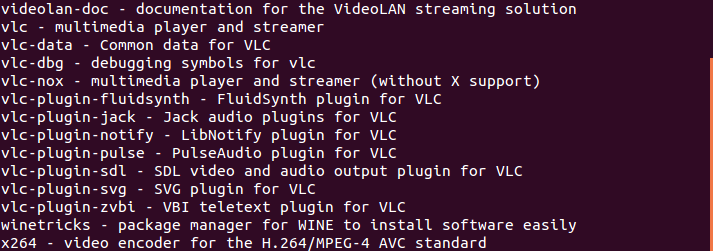
<li><p>Search for a package (for example, VLC)</p>

<pre><code>apt-cache search vlc
</code></pre></li>
</ul>


<p><img src="http://greplinux.com/images/ubuntu-terminal-apt-cache-search.png" title="Ubuntu Terminal apt-cache search" alt="Ubuntu Terminal showing sample output from the apt-cache search command"></p>

<ul>
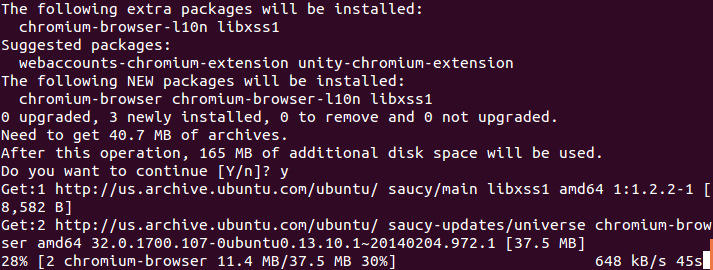
<li><p>Install a package (for example, the Chromium web browser)</p>

<pre><code>sudo apt-get install chromium-browser
</code></pre></li>
</ul>


<p><img src="http://greplinux.com/images/ubuntu-terminal-apt-get-install.png" title="Ubuntu Terminal apt-get install" alt="Ubuntu Terminal showing sample output from the sudo apt-get install command"></p>

<ul>
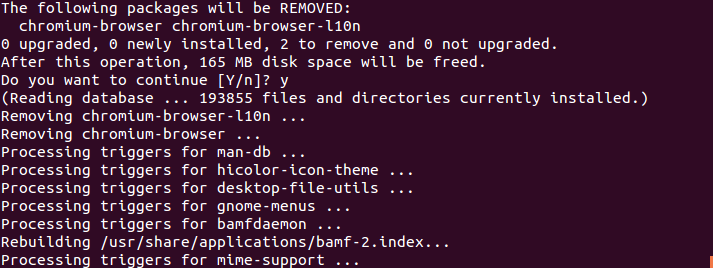
<li><p>Uninstall a package (for example, the Chromium web browser)</p>

<pre><code>sudo apt-get remove chromium-browser
</code></pre></li>
</ul>


<p><img src="http://greplinux.com/images/ubuntu-terminal-apt-get-remove.png" title="Ubuntu Terminal apt-get remove" alt="Ubuntu Terminal showing sample output from the sudo apt-get remove command"></p>

<p>Note here that one can install (or uninstall) many packages at once:</p>

<pre><code>sudo apt-get install libreoffice-writer libreoffice-calc vlc chromium-browser
</code></pre>

<p>and so on. Immediately one powerful use is clear: one can write a script to run when they do a fresh install of their OS that installs&hellip; <em>everything</em>. It might look like:</p>

<figure class='code'><figcaption><span>freshinstall </span></figcaption>
<div class="highlight"><table><tr><td class="gutter"><pre class="line-numbers"><span class='line-number'>1</span>
<span class='line-number'>2</span>
<span class='line-number'>3</span>
<span class='line-number'>4</span>
<span class='line-number'>5</span>
<span class='line-number'>6</span>
<span class='line-number'>7</span>
<span class='line-number'>8</span>
<span class='line-number'>9</span>
<span class='line-number'>10</span>
</pre></td><td class='code'><pre><code class=''><span class='line'>#!/bin/bash
</span><span class='line'>
</span><span class='line'>sudo apt-get update
</span><span class='line'>
</span><span class='line'>sudo apt-get install \
</span><span class='line'>libreoffice-writer \
</span><span class='line'>libreoffice-calc \
</span><span class='line'>vlc \
</span><span class='line'>chromium-browser \
</span><span class='line'>firefox</span></code></pre></td></tr></table></div></figure>


<p>and here the <code>\</code> was used to split a single command into multiple lines.</p>

<h2>The Rare Case: Not Using Package Managers</h2>

<p>While it&rsquo;s uncommon for typical users, there is some software generally not found in a distribution&rsquo;s repositories due to licensing or other legal issues, the distribution&rsquo;s principles, or other reasons. On occasion software will be available on the web for download as a .deb file (or for RPM-based distributions a .rpm file) &ndash; this is a Debian package just like one would install using the <em>apt</em> package manager. The difference is software installed this way generally won&rsquo;t be automatically upgraded with the rest of the system&rsquo;s packages so this is more similar to installing a .exe or .dmg file in Windows or Mac OS X.</p>

<p>Installing software this way is pretty simple: download the .deb file and double click it in the file manager. Ubuntu will install this using the Ubuntu Software Center, and other distributions may come with other graphical alternatives like <em>gdebi</em>. Alternatively, one can use the command line:</p>

<pre><code>sudo dpkg -i /path/to/package.deb
</code></pre>

<p>Again, software that is only available this way is rare. The most common case that I can think of is the proprietary Google Chrome browser (note that the open-source Chromium browser is essentially Chrome without certain proprietary Google built-ins, and this is typically found through the package managers of all major distributions). The interesting thing about this case is that when you install Google Chrome&rsquo;s .deb package it also adds a repository so that upgrading through your package manager also upgrades Chrome, so in this case the only hassle is fetching the .deb package online. Other software may not do that and will need to be handled manually.</p>

<h2>Closing Thoughts: A Case Example</h2>

<p>As I started on my own Linux journey I quickly found myself frequently switching distributions (or distro-hopping), and early on this was mainly constrained to different Ubuntu flavors (Ubuntu, Xubuntu, Kubuntu, etc) every time a new release occurred on those exciting April and October days. It wasn&rsquo;t too long until I discovered how easy it was to automate setting everything up cleanly again after another fresh install by writing a single shell script. A snippet of one of the scripts I used for setting up Ubuntu a while ago follows:</p>

<figure class='code'><figcaption><span>installitol </span></figcaption>
<div class="highlight"><table><tr><td class="gutter"><pre class="line-numbers"><span class='line-number'>1</span>
<span class='line-number'>2</span>
<span class='line-number'>3</span>
<span class='line-number'>4</span>
<span class='line-number'>5</span>
<span class='line-number'>6</span>
<span class='line-number'>7</span>
<span class='line-number'>8</span>
<span class='line-number'>9</span>
<span class='line-number'>10</span>
<span class='line-number'>11</span>
<span class='line-number'>12</span>
<span class='line-number'>13</span>
<span class='line-number'>14</span>
<span class='line-number'>15</span>
<span class='line-number'>16</span>
<span class='line-number'>17</span>
<span class='line-number'>18</span>
<span class='line-number'>19</span>
<span class='line-number'>20</span>
<span class='line-number'>21</span>
<span class='line-number'>22</span>
<span class='line-number'>23</span>
<span class='line-number'>24</span>
<span class='line-number'>25</span>
<span class='line-number'>26</span>
<span class='line-number'>27</span>
<span class='line-number'>28</span>
<span class='line-number'>29</span>
<span class='line-number'>30</span>
<span class='line-number'>31</span>
<span class='line-number'>32</span>
<span class='line-number'>33</span>
<span class='line-number'>34</span>
<span class='line-number'>35</span>
<span class='line-number'>36</span>
<span class='line-number'>37</span>
<span class='line-number'>38</span>
<span class='line-number'>39</span>
<span class='line-number'>40</span>
<span class='line-number'>41</span>
<span class='line-number'>42</span>
<span class='line-number'>43</span>
<span class='line-number'>44</span>
<span class='line-number'>45</span>
<span class='line-number'>46</span>
<span class='line-number'>47</span>
<span class='line-number'>48</span>
<span class='line-number'>49</span>
<span class='line-number'>50</span>
<span class='line-number'>51</span>
<span class='line-number'>52</span>
<span class='line-number'>53</span>
<span class='line-number'>54</span>
<span class='line-number'>55</span>
<span class='line-number'>56</span>
<span class='line-number'>57</span>
<span class='line-number'>58</span>
<span class='line-number'>59</span>
<span class='line-number'>60</span>
<span class='line-number'>61</span>
<span class='line-number'>62</span>
<span class='line-number'>63</span>
<span class='line-number'>64</span>
<span class='line-number'>65</span>
<span class='line-number'>66</span>
<span class='line-number'>67</span>
<span class='line-number'>68</span>
<span class='line-number'>69</span>
<span class='line-number'>70</span>
<span class='line-number'>71</span>
<span class='line-number'>72</span>
<span class='line-number'>73</span>
<span class='line-number'>74</span>
<span class='line-number'>75</span>
<span class='line-number'>76</span>
<span class='line-number'>77</span>
<span class='line-number'>78</span>
<span class='line-number'>79</span>
<span class='line-number'>80</span>
<span class='line-number'>81</span>
<span class='line-number'>82</span>
<span class='line-number'>83</span>
<span class='line-number'>84</span>
<span class='line-number'>85</span>
<span class='line-number'>86</span>
<span class='line-number'>87</span>
<span class='line-number'>88</span>
<span class='line-number'>89</span>
<span class='line-number'>90</span>
<span class='line-number'>91</span>
<span class='line-number'>92</span>
<span class='line-number'>93</span>
</pre></td><td class='code'><pre><code class=''><span class='line'>#!/bin/bash
</span><span class='line'>
</span><span class='line'>read -p "Input username: " username
</span><span class='line'>
</span><span class='line'>echo "Modifying /tmp to ram disk in fstab"
</span><span class='line'>echo -e "tmpfs\t/tmp\t\ttmpfs\tdefaults,noatime,mode=1777\t0\t0" >> /etc/fstab
</span><span class='line'>echo "Modifying swappiness and vfs_cache_pressure"
</span><span class='line'>echo "vm.swappiness=1" >> /etc/sysctl.conf
</span><span class='line'>echo "vm.vfs_cache_pressure=50" >> /etc/sysctl.conf
</span><span class='line'>
</span><span class='line'>echo "Adding ppas..."
</span><span class='line'>echo "Adding apt-fast ppa..."
</span><span class='line'>add-apt-repository -y ppa:apt-fast/stable
</span><span class='line'>
</span><span class='line'>apt-get update
</span><span class='line'>apt-get install -y --force-yes apt-fast
</span><span class='line'>
</span><span class='line'>echo "Removing some bloat..."
</span><span class='line'>apt-fast remove -y --force-yes --purge \
</span><span class='line'>aisleriot \
</span><span class='line'>brasero* \
</span><span class='line'>deja-dup \
</span><span class='line'>empathy* \
</span><span class='line'>gnome-contacts \
</span><span class='line'>gnome-mahjongg \
</span><span class='line'>gnome-orca \
</span><span class='line'>gnome-sudoku \
</span><span class='line'>gnome-mines \
</span><span class='line'>gwibber* \
</span><span class='line'>landscape-client-ui-install \
</span><span class='line'>onboard \
</span><span class='line'>rhythmbox* \
</span><span class='line'>simple-scan \
</span><span class='line'>thunderbird \
</span><span class='line'>totem* \
</span><span class='line'>ubuntuone* \
</span><span class='line'>unity-lens-gwibber \
</span><span class='line'>unity-lens-music \
</span><span class='line'>unity-lens-photos \
</span><span class='line'>unity-lens-shopping \
</span><span class='line'>unity-lens-video \
</span><span class='line'>unity-scope-gdrive
</span><span class='line'>
</span><span class='line'>apt-fast autoremove -y --force-yes --purge
</span><span class='line'>
</span><span class='line'>echo "Preparing to install packages..."
</span><span class='line'>apt-fast install -y --force-yes \
</span><span class='line'>djview-plugin \
</span><span class='line'>faience-icon-theme faience-theme \
</span><span class='line'>fail2ban \
</span><span class='line'>filezilla \
</span><span class='line'>frotz \
</span><span class='line'>gimp gimp-data-extras gimp-plugin-registry \
</span><span class='line'>git \
</span><span class='line'>gparted \
</span><span class='line'>grsync \
</span><span class='line'>guake \
</span><span class='line'>htop \
</span><span class='line'>iftop \
</span><span class='line'>indicator-multiload \
</span><span class='line'>iotop \
</span><span class='line'>keepassx \
</span><span class='line'>links2 \
</span><span class='line'>lm-sensors \
</span><span class='line'>nethogs \
</span><span class='line'>numix-gtk-theme \
</span><span class='line'>openssh-client openssh-server openssh-blacklist openssh-blacklist-extra \
</span><span class='line'>p7zip-full p7zip-rar \
</span><span class='line'>pdfshuffler \
</span><span class='line'>pidgin \
</span><span class='line'>powertop \
</span><span class='line'>psensor \
</span><span class='line'>python-bs4 python-html5lib python-lxml python-matplotlib python-mechanize python-numpy python-scipy cython \
</span><span class='line'>r-base r-base-html \
</span><span class='line'>ranger \
</span><span class='line'>screen \
</span><span class='line'>scrot \
</span><span class='line'>sshfs \
</span><span class='line'>synergy \
</span><span class='line'>sysstat \
</span><span class='line'>ubuntu-restricted-extras \
</span><span class='line'>unity-tweak-tool \
</span><span class='line'>vim vim-gtk \
</span><span class='line'>vlc vlc-plugin-pulse
</span><span class='line'>
</span><span class='line'>echo "Setting up sshfs..."
</span><span class='line'>modprobe fuse
</span><span class='line'>adduser $username fuse
</span><span class='line'>chown root:fuse /dev/fuse
</span><span class='line'>chmod +x /dev/fuse
</span><span class='line'>
</span><span class='line'>echo "Initializing sensors"
</span><span class='line'>sensors-detect</span></code></pre></td></tr></table></div></figure>


<p>You can see how this script combines modifying certain system configurations, updating software repositories (through what is called a <em>ppa</em> in this case), and removing, upgrading, and installing packages all in the confines of one script. There are plenty of other more user-specific things one can include to set everything back up with a script like this, but the point here is how efficiently we can set up a system exactly how we want it thanks to Linux paradigms like package management and command-line utilities. I would encourage everyone to keep an open mind in this regard and see where their own explorations lead them.</p>
]]></content>
  </entry>
  
  <entry>
    <title type="html"><![CDATA[Account Password Security: Advanced Edition]]></title>
    <link href="http://greplinux.com/blog/2014/02/12/account-password-security-advanced-edition/"/>
    <updated>2014-02-12T10:13:22-06:00</updated>
    <id>http://greplinux.com/blog/2014/02/12/account-password-security-advanced-edition</id>
    <content type="html"><![CDATA[<h2>Just the Steps</h2>

<p>What follows is a discussion on how to use file sync software like Dropbox and encryption software like TrueCrypt to securely and conveniently access an offline password database like those created through KeePassX on every device. The idea is to create a small encrypted file container with TrueCrypt, place the password database inside of it, and sync the file container using Dropbox. Then on any device access the file container in Dropbox, decrypt and mount it with TrueCrypt, and load the password database with KeePassX; this only has to be done once until a device is shut down. The result is a highly secure and convenient way of managing online account credentials.</p>

<p>A thorough look with all the details follows.<!--more--></p>

<h2>I Have a Local Password Database, Now What?</h2>

<p>Suppose you followed my advice in the Basic Edition and have created an <a href="http://greplinux.com/blog/2014/01/25/lets-talk-shared-passwords-basic-edition/">encrypted KeePassX password database</a> that now contains all the credentials and security questions for your online accounts in one easy-to-use bucket. This is a local solution so the password database resides on your computer, but maybe you have multiple computers and mobile devices. Also, as I mentioned there this does place all your eggs in one basket so to speak so securing that basket is critical. There&rsquo;s a nice and secure way to fix these problems without resorting to trusting a closed source platform like <a href="https://lastpass.com/">LastPass</a> to manage both their and your security. I propose using two applications to help accomplish this task: Dropbox and TrueCrypt.</p>

<h3><a href="https://www.dropbox.com/">Dropbox</a></h3>

<p>Dropbox is a cloud storage and file sync service. For the uninitiated, you download the client software,  create an account, and a special folder called Dropbox will be placed in your computer&rsquo;s home folder. All files placed in here will be synced and stored online on Dropbox&rsquo;s servers (<a href="https://www.dropbox.com/help/27/en">Dropbox claims to encrypt the transfers and storage</a>), and any other devices you install Dropbox on will have access to these same files. Dropbox was the first such service to really catch on due to its simplicity, and I believe it&rsquo;s still the best for a few reasons:</p>

<ul>
<li>It&rsquo;s fully cross-platform (they even support installation on a headless server)</li>
<li>Its sync times are faster than the other cross-platform alternatives</li>
<li>It&rsquo;s a very hands-off solution; all the magic happens without your intervention</li>
</ul>


<p>That being said some alternatives are <a href="https://drive.google.com">Google Drive</a>, <a href="https://skydrive.live.com">Microsoft SkyDrive</a>, and <a href="https://www.box.com/">Box</a>. None of these meet all three points I listed above in my experience.</p>

<p>Whatever your choice (I&rsquo;ll assume Dropbox for the remainder but the procedures are the same), these sorts of services will clearly solve our problem of having a local password database on only one device in the easiest manner possible; just use the service to sync the database and use KeePassX to load it wherever you go. However, since Dropbox requires trusting your data to Dropbox&rsquo;s servers there is a degree of risk and concern for privacy despite their use of server-side encryption; <a href="https://en.wikipedia.org/wiki/Dropbox_(service)#Privacy_concerns">there have been a few snafus</a> but no reports of data theft. Regardless, it would be ideal not to have to trust your collection of online account credentials to a third party&rsquo;s security; as we&rsquo;ve seen before <a href="http://greplinux.com/blog/2014/01/29/the-at-n-hack-why-absolute-security-is-a-myth/">perfect security doesn&rsquo;t exist</a>, and the more layers we can add without sacrificing much convenience, the better. This leads us to&hellip;</p>

<h3><a href="http://www.truecrypt.org/">TrueCrypt</a></h3>

<p>TrueCrypt is open source cross-platform encryption software that can be used to, among other things, create strongly encrypted file containers. These containers appear as a regular file with size equal to the storage space allocated to the container and, once mounted and decrypted, allow the user to store and access any data inside. In case you&rsquo;re unfamiliar with the software you may consult the <a href="http://www.truecrypt.org/docs/">official documentation</a> or my <a href="http://greplinux.com/resources/truecrypt-encryption-overview/">overview of TrueCrypt</a>; while it&rsquo;s reasonably straightforward there are some considerations such as choosing between standard volumes and hidden volumes that employ <a href="https://en.wikipedia.org/wiki/TrueCrypt#Plausible_deniability">plausible deniability methods</a>.</p>

<p>Immediately it&rsquo;s clear how TrueCrypt can be used to alleviate the problem of placing all of our trust in the hands of Dropbox. Instead of syncing the encrypted password database which, if stolen due to a Dropbox security lapse, might be subject to some vulnerability in KeePassX encryption or a brute force attack if you used a weak password (<a href="http://greplinux.com/resources/memorizing-strong-passwords/">memorize a strong password instead!</a>), one can sync an encrypted TrueCrypt file container which holds the KeePassX database.</p>

<h2>Putting it Together</h2>

<p>Now we&rsquo;ve seen all the pieces of this scheme for conveniently securing your online account credentials without needing to completely trust a single third party: KeePassX, Dropbox, and TrueCrypt (or your preferred equivalents). This is how it all fits together:</p>

<h3>Setup</h3>

<ol>
<li>Gather all of your online account credentials into an encrypted password database using software like KeePassX, ideally using it to <a href="http://greplinux.com/blog/2014/01/25/lets-talk-shared-passwords-basic-edition/">create maximum length random passwords</a> for each account.</li>
<li>Create an account for Dropbox or a similar file sync service and install the client software on all of your devices.</li>
<li>Create a small encrypted file container with TrueCrypt or equivalent software, place the KeePassX database inside of it, and move the file container to Dropbox to be synced.</li>
</ol>


<h3>Every Day Use</h3>

<ol>
<li>Any time a particular device is rebooted, mount the TrueCrypt file container.</li>
<li>Open the password database found inside the mounted file container using KeePassX.</li>
<li>Any time you need to log into an account, copy and paste the credentials using KeePassX (by default these credentials are cleared from the clipboard after 20 seconds).</li>
</ol>


<h3>By the Numbers</h3>

<ul>
<li>Number of one-time steps each time a device is rebooted: 2</li>
<li>Number of passwords to remember: 2</li>
<li>Effort to take to log into any of your accounts: click (to copy username), paste, click (to copy password), paste</li>
</ul>


<h2>Concluding Remarks</h2>

<p>When most people hear words like encryption and security they think of things that get in the way of doing what needs to be done &mdash; things that complicate their life. I would simply ask whether the reality laid out in the <strong>By the Numbers</strong> section above is more or less complicated than memorizing any number of usernames, passwords, and security questions, sometimes being required to change them frequently, and possibly resorting to sharing credentials between accounts.</p>

<p>It&rsquo;s not often one can enhance both security and convenience at the same time but I suggest this is one of those times.</p>
]]></content>
  </entry>
  
  <entry>
    <title type="html"><![CDATA[Not Just the NSA: Privacy Breaches Closer to Home]]></title>
    <link href="http://greplinux.com/blog/2014/02/03/not-just-the-nsa-privacy-breaches-close-to-home/"/>
    <updated>2014-02-03T17:40:33-06:00</updated>
    <id>http://greplinux.com/blog/2014/02/03/not-just-the-nsa-privacy-breaches-close-to-home</id>
    <content type="html"><![CDATA[<h2>In Short: Negligence and Privacy</h2>

<p>These days talk of the <a href="http://www.theguardian.com/world/interactive/2013/nov/01/prism-slides-nsa-document">NSA&rsquo;s PRISM program</a> and its other surveillance programs tend to be the focus of privacy discussions, but recent gaffes like at yesterday&rsquo;s Super Bowl XLVIII and more serious incidents such as during the trial of George Zimmerman for Trayvon Martin&rsquo;s murder show us that the average Joe can cause serious privacy leaks as well.</p>

<p>I give an overview of these events and offer a suggestion on the sort of vigilance you should keep in mind.<!--more--></p>

<h2>Super Bowl XLVIII as a Case Study</h2>

<p>During yesterday&rsquo;s Super Bowl there was an amusing incident in which the <a href="http://www.zdnet.com/super-bowl-wi-fi-password-credentials-broadcast-in-pre-game-security-gaffe-7000025865/">stadium&rsquo;s internal wifi credentials were broadcast on national television</a>; social media pounced on this and spread a snapshot of the monitor displaying the credentials rapidly. This incident serves to illustrate that privacy breaches can happen much closer to home than those focusing on the NSA might be most wary of. Indeed, while companies like <a href="http://www.wired.com/threatlevel/2014/02/prism-numbers">Google and Yahoo received 59,000 NSA demands for account contents</a> over the past six months, having everyone in your vicinity being made aware of your wifi SSID and password or more sensitive information is probably a more immediate and tangible concern and much more likely to happen to ordinary, <em>boring</em> (to the NSA) individuals.</p>

<h2>The Zimmerman Trial Leaked Personal Information</h2>

<p>The media &mdash; cameramen in particular &mdash; were responsible for the aforementioned Super Bowl wifi incident; they were also responsible for a much more dangerous breach of privacy. During the highly polarizing and controversial trial of George Zimmerman for the murder of Trayvon Martin, <a href="http://www.nydailynews.com/news/national/cnn-airs-george-zimmerman-social-security-number-article-1.1388258">CNN broadcasted unredacted footage of Zimmerman&rsquo;s personal identifiers</a> including his date of birth, address, phone number, and most alarmingly his <strong>social security number</strong>.</p>

<p>However one felt personally about Zimmerman prior to the outcome of the trial, nobody deserves to have their personal information leaked against their will <em>especially</em> when they&rsquo;re at the epicenter of such controversy and polarization. All of these personal identifiers are often used to verify one&rsquo;s identity for healthcare and a variety of other services. One hopes that representatives of the various services Zimmerman used were alerted and were able to catch on to what was likely a deluge of attempts to mine more of his personal information or disrupt his life by engaging in identity theft, but this is <em>very</em> wishful thinking; when attacks like this are successful they are very costly and troublesome to recover from. At the end of the day this was all due to the negligence of one ordinary cameraman.</p>

<p>Again, it wasn&rsquo;t a nebulous United States government entity but instead a nearby individual who was the biggest cause of concern.</p>

<h2>When Will Your Personal Information be at Risk?</h2>

<p>To be sure, most of us probably won&rsquo;t find ourselves in a situation where we need to manage some sort of secret information in an at-all public area, and I&rsquo;m not going to pretend it&rsquo;s worthwhile being overly vigilant about those around you beyond reasonable common sense. Instead, given the nature of the incidents I&rsquo;ve mentioned, I&rsquo;m going to urge caution with <em>others&#8217;</em> personal information if it could ever come up as part of your job or regular life.</p>

<p>One of the projects I worked on in the past involved thoroughly tagging images with metadata, and in a legacy system there was one entry of distantly personally identifying information temporarily stored in the images to facilitate a process. Had I overlooked this and not purged the metadata afterward it would be possible for several images to be floating around the web tagged with some weak identifiers, but even weak identifiers can be used to discover more confidential information; the age of big data, machine learning, and predictive analytics on the whole <a href="http://www.forbes.com/sites/kashmirhill/2012/02/16/how-target-figured-out-a-teen-girl-was-pregnant-before-her-father-did/">prove this beyond a shadow of a doubt</a>.</p>
]]></content>
  </entry>
  
  <entry>
    <title type="html"><![CDATA[Password Security Failure: When Websites Don't Get It]]></title>
    <link href="http://greplinux.com/blog/2014/01/31/password-security-failure-when-websites-dont-get-it/"/>
    <updated>2014-01-31T23:02:00-06:00</updated>
    <id>http://greplinux.com/blog/2014/01/31/password-security-failure-when-websites-dont-get-it</id>
    <content type="html"><![CDATA[<h2>In Brief: Many Websites are Visibly Vulnerable</h2>

<p>While I&rsquo;ve <a href="http://greplinux.com/blog/2014/01/29/the-at-n-hack-why-absolute-security-is-a-myth/">discussed how absolute security is impossible</a>, there&rsquo;s a difference between building a secured website that may be breached by a concerted and resourceful effort and building a website that advertises potential <abbr title="Ways that an attacker may breach security">attack vectors</abbr>. Several websites are guilty of this and do things like email <abbr title="The original password before it has been encrypted by a hash function">plaintext</abbr> passwords or use unnecessarily restrictive password rules; these problems tend to make it much easier for an attacker to compromise user credentials.</p>

<p>For a more detailed look into the problem and ways to begin mitigating it, read on.<!--more--></p>

<h2>Raising Awareness: Plain Text Offenders</h2>

<p>I discovered an excellent website the other day called <em>Plain Text Offenders</em> that <a href="http://plaintextoffenders.com/">catalogs websites caught storing passwords in plaintext</a>. Websites like this deserve to be shamed because it&rsquo;s a potentially serious security issue: look at the recent <a href="http://arstechnica.com/security/2014/01/mass-hack-attack-on-yahoo-mail-accounts-prompts-password-reset/">Yahoo account password breach</a> that caused quite a stir; this attack was at least partially facilitated by username/password credentials collected from other websites that happened to be reused for Yahoo email accounts. Often when username/password combinations are seized from unsecured websites the attackers either reuse them for further attacks as was the case with Yahoo, <a href="http://www.pcworld.com/article/194843/article.html">sell them</a>, or <a href="http://pastebin.com/JdQkuYwG">publish them publicly</a> (this is trivially available through a search for &lsquo;pastebin username password combinations&rsquo; and is an excerpt of releases from the <a href="http://money.cnn.com/2012/05/08/technology/twitter-hack/index.htm">2012 Twitter password breach</a>).</p>

<p>A website storing plaintext passwords is also likely to have weak security leading up to access to their database itself so these websites are potentially easy and lucrative targets for attackers. It&rsquo;s like a bicycle thief: even if they have the means to break through a bike locked with both a U-lock and chain lock, if there&rsquo;s another bike of similar value with just a rusty old chain lock why bother stealing the first one?</p>

<h2>Know Your Hashing</h2>

<p>For the following discussion I&rsquo;m going to assume a basic working knowledge of what a cryptographic hash function is and its basic properties; the uninitiated might want to consult the <a href="https://simple.wikipedia.org/wiki/Cryptographic_hash_function">Simple Wikipedia</a> article; otherwise, I&rsquo;ll try to give a brief rundown.</p>

<p>A cryptographic hash function is a way of converting some data &mdash; for our purposes this data will be a <abbr title="The original password before it has been encrypted by a hash function">plaintext</abbr> password &mdash; into a fixed-length string called the hash value. For instance, one of the older hash functions (which, for the record, should <strong>never</strong> be used for passwords) is called MD5, and <code>MD5(&ldquo;123456&rdquo;)=e10adc3949ba59abbe56e057f20f883e</code>. A hash function should have these properties:</p>

<ol>
<li>It can be easily computed in less than a second (<em>note</em>: for passwords, faster isn&rsquo;t better)</li>
<li>It is <em>extremely</em> difficult (computationally and ultimately financially expensive) to reverse engineer, or <em>invert</em>, the plaintext password from the hash value</li>
<li>It is <em>extremely</em> rare for two distinct inputs to give the same hash value (known as a collision)</li>
</ol>


<p>When it was made in 1991 MD5 seemed like a fine hash function, but these days it&rsquo;s very trivial to invert MD5 hashes and there are modern alternatives much more appropriate to current needs.</p>

<h2>The Red Flags</h2>

<p><em>Plain Text Offenders</em> performs what I consider to be an important public service by calling out these websites that store passwords in plaintext. With a basic understanding of hashing in hand, let&rsquo;s look into why this is an issue and also consider some other common practices that <em>may</em> be troublesome and at the very least merit vigilance.</p>

<h3>Password Recovery Emails Containing Plaintext Password</h3>

<p>This case is the focus of <em>Plain Text Offenders</em>. Some websites allow you to &ldquo;recover&rdquo; your password which results in receiving an email containing the plaintext password itself. If you registered with a password of &ldquo;123456&rdquo; then you receive that exact string in the email. There are two important issues with this.</p>

<p>First, if a website&rsquo;s security is compromised then there&rsquo;s <em>nothing</em> in the way of the attackers immediately commandeering every account. Keep in mind how <a href="http://greplinux.com/blog/2014/01/29/the-at-n-hack-why-absolute-security-is-a-myth/">there is no such thing as perfect security</a>; given enough motivation and effort, any website <em>will</em> be able to be compromised. The likelihood of developers properly securing the website and then leaving passwords stored in plaintext is effectively zero; if you&rsquo;re able to receive an email like this, <em>be worried</em> and <a href="http://greplinux.com/blog/2014/01/25/lets-talk-shared-passwords-basic-edition/">do not share that password with <em>any</em> other accounts</a> &mdash; delete the account if possible.</p>

<p>If passwords are even weakly hashed then attackers will have to expend <em>some</em> time and effort to determine the plaintext; if the website administrators happen to be on their toes and the breach is detected then this gives them time to reset passwords and notify their users. If passwords are properly strongly hashed then attackers may not be able to determine the plaintext at all unless they&rsquo;re <a href="http://www.unlimitednovelty.com/2012/03/dont-use-bcrypt.html">very well-funded</a>, and even then it can take a very long time.</p>

<p>Second, email is inherently insecure as it&rsquo;s an unencrypted form of communication susceptible to <abbr title="An attacker intercepts messages between two parties while hiding the interception">man-in-the-middle</abbr> attacks. This is a less likely avenue of attack since it typically requires some sophistication; <a href="https://www.techdirt.com/articles/20130910/10470024468/flying-pig-nsa-is-running-man-middle-attacks-imitating-googles-servers.shtml">the NSA has been impersonating Google servers to do this</a> for example, but &ldquo;average&rdquo; attackers are less likely to try.</p>

<h3>Password Reset Emails Contain the New Password</h3>

<p>Sometimes when you use a website&rsquo;s password reset functionality this results in receiving an email containing the new password. This doesn&rsquo;t <em>necessarily</em> mean that the website isn&rsquo;t hashing this new password as they could have stored the hash value after sending the reset email, but that&rsquo;s still a real concern.</p>

<p>Beyond this we return to the insecurity of email described in the previous paragraph: the new password can still be intercepted by a determined attacker. Last but not least this leaves a copy of your plaintext password in your email; if you leave your email open and leave the room and a physically-nearby attacker searches your email for &ldquo;password&rdquo; then suddenly they have your login credentials.</p>

<h3>Registration Limits Password Length and/or Punctuation</h3>

<p>It&rsquo;s the norm for there to be <em>some</em> limits on the length and acceptable characters for a password; this is smart since it would be unwise to allow arbitrarily long form inputs with an uncertain character set that could cause problems with your system. However, the problem comes with overly restrictive limitations. The worst I&rsquo;ve seen has been forcing passwords to be 6-12 characters and alphanumeric <em>only</em> (no punctuation or spaces). This is a <em>very</em> bad practice.</p>

<ol>
<li>If repeated login attempts aren&rsquo;t properly limited then a short upper limit makes <abbr title="Going through every possibility to find a match">brute force</abbr> guessing of a password trivial</li>
<li>Restrictive limitations on length and accepted characters means that an attacker has <em>far</em> fewer possibilities to deal with when trying to determine the plaintext; if the website doesn&rsquo;t use a hashing procedure that defeats brute force attacks then these passwords aren&rsquo;t secure</li>
<li>Restricting punctuation brings into question whether the website is <abbr title="Escaping characters used in database queries to prevent modifying the query through user input">cleansing user input</abbr> to prevent <a href="https://en.wikipedia.org/wiki/Sql_injection">SQL injection</a> attacks</li>
<li>Restrictions like this make one question how the website is storing passwords in the first place; some websites might restrict the length because they&rsquo;re storing these passwords in plaintext in their database with a fixed-length storage type</li>
</ol>


<p>While these problems are just speculative, they&rsquo;re all possible inferences based on these restrictions and a malicious attacker will take this into account. I genuinely put on a wide smile when I encounter a website that allows a <a href="http://greplinux.com/blog/2014/01/25/lets-talk-shared-passwords-basic-edition/">100+ character password using any character on a standard QWERTY keyboard</a>.</p>

<h2>Conclusion: Education is Key</h2>

<p>I can only imagine that the website administrators just aren&rsquo;t aware of either the implications of their password storage practices or the ease of implementing a decent hashing algorithm. <em>Plain Text Offenders</em> has a section dedicated to <a href="http://plaintextoffenders.com/reformed">praising former offenders who reformed their ways</a> and secured user passwords. Contacting website administrators when you notice poor practices with a constructively written suggestion is a good way to help.</p>
]]></content>
  </entry>
  
  <entry>
    <title type="html"><![CDATA[The @N Hack: Why Absolute Security is a Myth]]></title>
    <link href="http://greplinux.com/blog/2014/01/29/the-at-n-hack-why-absolute-security-is-a-myth/"/>
    <updated>2014-01-29T20:05:46-06:00</updated>
    <id>http://greplinux.com/blog/2014/01/29/the-at-n-hack-why-absolute-security-is-a-myth</id>
    <content type="html"><![CDATA[<h2>The Gist: Trust and Error Defeat Security</h2>

<p>A recent social engineering attack on PayPal and GoDaddy allowed an attacker to commandeer the victim&rsquo;s email on GoDaddy and hold his Facebook account hostage in order to facilitate the transfer of the @N Twitter handle (reportedly worth about $50,000 USD) to the attacker. This incident illustrates how organizations fail to train their representatives to resist old and simple social engineering techniques. More broadly I use this as a case study with which to demonstrate how no matter what, we can never have absolute security when it comes to safeguarding our online presence; between social engineering attacks and zero-day exploits we can always expect there to be a weak link in a long chain of security.</p>

<p>Read on for full details.<!--more--></p>

<h2>A Social Engineering Case Study</h2>

<p>There&rsquo;s been a lot of buzz surrounding <a href="http://thenextweb.com/socialmedia/2014/01/29/lost-50000-twitter-username/#!tVFXp">Naoki Hiroshima&rsquo;s harrowing ordeal</a> in which an attacker used <abbr title="Manipulating people into revealing confidential information">social engineering</abbr> techniques to commandeer Mr. Hiroshima&rsquo;s GoDaddy email account; the goal of this attack was to obtain his @N Twitter account, a coveted single-letter Twitter handle allegedly worth no less than $50,000 USD. Once the attacker obtained the upper hand by seizing Mr. Hiroshima&rsquo;s Facebook account and succeeded in having him hand over the Twitter account, he explained his methods.</p>

<p>Posing as a PayPal employee, the attacker had called PayPal and obtained the last four digits of Mr. Hiroshima&rsquo;s credit card. With this in hand he was able to call GoDaddy and feign having lost the card he used to purchase a domain name; using these last four digits he was allowed to guess the first two until he got it right and finally reset the account&rsquo;s security. That was all it took to get to the Facebook account which was enough encouragement for Mr. Hiroshima to hand over the Twitter account.</p>

<p>There are some other technical particulars involved but the point here is the way social engineering techniques can, without much trouble, bypass both traditional and advanced account security measures.</p>

<h2>Old Tricks</h2>

<p>Social engineering attacks aren&rsquo;t remotely new. I&rsquo;m not familiar with the earliest history, but to further the point take this <a href="http://www.youtube.com/watch?v=_G3NT91AWUE">wonderfully cheesy scene from the 1995 film Hackers</a> in which Jonny Lee Miller&rsquo;s character coaxes a security guard into providing information about a modem&rsquo;s hardware which helps him break into their systems. In any event, this is not a new idea and there are <a href="http://www.csoonline.com/article/663329/social-engineering-3-examples-of-human-hacking">numerous</a> <a href="http://www.bancsec.com/in-the-news">examples</a> to be studied but, as the recent events involving Mr. Hiroshima illustrate, not necessarily learned from. Consider some other not-exactly-groundbreaking security mishaps:</p>

<ul>
<li><a href="http://thehackernews.com/2014/01/mac-os-x-flashback-trojan-is-still.html">Apple&rsquo;s Flashback Trojan</a> incident caused by an unpatched Java version; Apple took three months since the exploit was originally published and fixed to release the patch to end-users</li>
<li><a href="http://blog.soa.com/snapchat-api-hack/">Snapchat had 4.6 million user name and phone number combinations published</a> owing to, fundamentally, a lack of rate limiting and bot abuse prevention in their API but also by failure to respond to an exploit disclosure by <abbr title="Individuals who benevolently attempt to exploit systems in order to notify those in charge and issue fixes">white hat</abbr> security researchers</li>
<li><a href="http://www.infoworld.com/d/security/backdoor-found-in-d-link-router-firmware-code-228725">Several D-Link routers were found to have a backdoor</a> in their firmware that would allow an attacker to alter the device&rsquo;s settings thereby allowing several attacks</li>
</ul>


<h2>The Problem of Trust</h2>

<p>The examples of breaches I&rsquo;ve outlined so far boil down to needing to place at least part of your security in the hands of a third party. It&rsquo;s effectively impossible to eliminate the need to trust third parties while using any sort of online technology. In 1984 <a href="http://c2.com/cgi/wiki?TheKenThompsonHack">Ken Thompson described a theoretical hack</a> based on a compromised compiler that would result in a nearly undetectable backdoor that couldn&rsquo;t be avoided without unplugging your hardware and putting on a tin foil hat. Regarding more tangible events, among the recent NSA spying revelations was an allegation that the security company <a href="http://www.theguardian.com/technology/2013/dec/23/security-company-rsa-denies-installing-nsa-back-door">RSA may have created a backdoor for the NSA</a> in one of their encryption algorithms; the details are fairly technical and mathematical but essentially a random number generator can be constructed in a poor way so as to make the numbers predictable &mdash; this would disrupt the strength of the encryption.</p>

<p>Whether due to negligence in the case of PayPal, GoDaddy, Apple, Snapchat, and probably D-Link or due to malicious intent in the case of the Ken Thompson hack or (allegedly) the RSA collusion, trusting a third party can be a necessary weak link in one&rsquo;s personal security. Ultimately this boils down to relying on humans who, like all of us, are liable to make mistakes or be influenced into making unethical decisions. This will <em>never</em> change, and this will <em>always</em> be an attack vector for security breaches.</p>

<h2>Forget Trust: Zero-Day Exploits</h2>

<p>The impossibility of absolute security isn&rsquo;t just down to negligence and manipulation; there&rsquo;s a simple universal fact of software engineering: we can never expect any software to be completely secure and unexploitable. <em>Ever</em>. There&rsquo;s an unending struggle between white hat and <abbr title="Individuals who malevolently attempt to exploit systems for personal gain">black hat</abbr> hackers; white hats continuously try to penetrate their own systems so as to fix security holes while black hats attempts to beat them so they can profit or otherwise benefit from it. Sometimes the black hats get there first, and that&rsquo;s what constitutes a zero-day attack: one that hadn&rsquo;t been discovered previously and is actively being exploited.</p>

<p>In 2008 a <a href="http://news.bbc.co.uk/2/hi/technology/7784908.stm">security flaw in Microsoft Internet Explorer</a> was discovered that would result in victims losing control of their computers and passwords; this was said to affect all versions of the browser dating back to 2001. A <a href="http://www.theregister.co.uk/2012/10/24/zero_day_study/">2012 study by Symantec researchers</a> suggested that black hat hackers have an average of ten months before details of an exploit are made public.</p>

<p>There are entire <a href="http://www.forbes.com/sites/andygreenberg/2012/03/23/shopping-for-zero-days-an-price-list-for-hackers-secret-software-exploits/">black markets devoted to selling exploits</a> and more recently efforts by companies like <a href="http://www.infoworld.com/d/security/microsoft-google-and-facebook-team-new-bug-bounty-program-230396">Google, Microsoft, and Facebook to offer competitive bounties</a> to white hat security researchers for finding and reporting exploits. The risk of this sort of attack can never be eliminated, and preventative measures focus on a combination of investment in security research by the software developers and by prompt updates by end-users; neither is a trivial expectation by any stretch.</p>

<h2>Conclusion: Abandon all Hope?</h2>

<p>No, not quite. While it&rsquo;s important to be aware of this unfortunate truth, it shouldn&rsquo;t stop an individual from doing the best they reasonably can to secure themselves. This can involve <a href="http://greplinux.com/blog/2014/01/25/lets-talk-shared-passwords-basic-edition/">improving the security of your online accounts</a> and keeping your systems up to date. Dialing your security down to 0 just because you can never ramp it up to 100 isn&rsquo;t wise &mdash; <a href="http://www.bbc.co.uk/news/technology-21160818">Sony learned that the hard way</a>. Beyond this we can try to find reasonably easy ways to safeguard our personal data; I hope to cover some notable methods in the coming days.</p>
]]></content>
  </entry>
  
  <entry>
    <title type="html"><![CDATA[Linux Fragmentation and New Users]]></title>
    <link href="http://greplinux.com/blog/2014/01/27/linux-fragmentation-and-new-users/"/>
    <updated>2014-01-27T20:37:08-06:00</updated>
    <id>http://greplinux.com/blog/2014/01/27/linux-fragmentation-and-new-users</id>
    <content type="html"><![CDATA[<h2>The Bottom Line</h2>

<p>There are some particular perceptions among many non-Linux users that in order to use Linux one must be</p>

<ul>
<li>Willing to <em>resort</em> to the command line to accomplish mundane tasks</li>
<li>A computer science major</li>
<li>Able to find and rely on others to use their own system</li>
</ul>


<p>While I disagree with these views on the whole, I think there is a degree of merit provided one applies a more level-headed tone to the rhetoric; instead of discussing that I&rsquo;d like to consider <em>why</em> these perceptions exist. I propose that a major cause is the vast fragmentation of the Linux platform.</p>

<p>While Linux fragmentation offers truly &mdash; without exaggeration &mdash; unparalleled freedom of choice when it comes to customizing one&rsquo;s computing interface and workflow, this can make offering help to any individual through their particular <abbr title="Graphical User Interface">GUI</abbr> very cumbersome. Consequently, the terminal becomes the common denominator since there are only a few common Linux filesystem layouts in use by the various distributions and the GNU Core Utilities can be assumed to be installed on any Linux system. This makes offering terminal commands the most direct approach for most people offering assistance to others, and this helps bolster the aforementioned perceptions: if everyone is receiving help through terminal commands, <em>surely</em> this is the only way to fix these problems.</p>

<p>The best we can do is accept that some people will feel this way and attempt to educate them on the benefits of computing diversity and choice; whether this is important to them or not is their choice, and perhaps they&rsquo;ll come around to appreciating this diversity.</p>

<p>Keep reading for a more thorough analysis.<!--more--></p>

<h2>A Particular Case</h2>

<p>Today I was reading a question about permissions from a new Linux user having troubles with reading some files on external storage drives. What really caught my eye about this wasn&rsquo;t the subject of the question itself but rather a comment in the first reply:</p>

<blockquote><p><blockquote><p>have not tried the command line method from >terminal. Don&#8217;t understand the structure.</p><footer><strong>fusionstate</strong></footer></blockquote><br/>I&#8217;d suggest learning the rudiments of using the command line. Most folks here that can help you out will need you to enter commands from said command line.</p><footer><strong>Spect73</strong> <cite><a href='http://www.linuxquestions.org/questions/linux-newbie-8/file-permissions-once-again-the-permissions-questions-4175490031/'>File Permissions- Once Again the Permissions Questions??</a></cite></footer></blockquote>


<p>This is a very common phenomenon: a new or otherwise terminal-illiterate Linux user runs into a problem and asks around for help, and often this help comes in the form of commands to enter in the terminal to help diagnose the problem. This in turn leads to negative attitudes toward Linux even from people merely observing this sort of thing:</p>

<ul>
<li>You can&rsquo;t use Linux without using the terminal</li>
<li>Linux is only for computer science majors</li>
<li>Nobody could use Linux on their own</li>
</ul>


<p>There&rsquo;s a degree of truth to each of these points provided you add some reasonable and level-headed qualifiers. I propose that Linux fragmentation is one of the leading reasons that users asking for help receive it via terminal input.</p>

<h2>An Open Platform</h2>

<p>Let&rsquo;s think about the two major computing ecosystems in play for end users: desktop and mobile.</p>

<h3>Mobile: iOS Compared to <abbr title="A point that many miss: all Android devices run on the Linux kernel">Android/Linux</abbr></h3>

<p><em>Disclaimer</em>: I&rsquo;ve used both Android devices (in the Nexus family) and an iPhone 4S; I happily prefer Android</p>

<p>iOS is of course a very locked-down and closed platform &mdash; no sane person would argue this point. You get your One Interface and you had better like it; the ability to customize it is minimal and the options in general are very limited. The <abbr title="Operating System">OS</abbr>, which most users are generally on the latest version of, resides on one of just a few hardware variants. This makes it very straightforward to troubleshoot any problems &mdash; which, in principle, should be few and far between since the software is tailored for about as many hardware variants as you have fingers &mdash; since you can always direct them to a predictable menu or whatever is needed.</p>

<p>Compare this to Android where there is a much broader representation of OS versions in use and for each version it might be on any number of hardware variants even per device model; the <a href="http://www.engadget.com/2012/07/05/samsung-galaxy-s-iii-lte-korea-launch-date-july-9th/">Samsung Galaxy S III shipped with different chips</a> in the Korean version and the US version. Finally, you have different manufacturer skins (HTC Sense, Samsung TouchWiz, etc) that have wildly distinct interfaces, and on top of that you could have carrier-specific bloatware that may need to be taken into consideration as well. This results in a <em>massive</em> range of distinct ways to go about addressing an individual&rsquo;s problem; even if you&rsquo;re trying to help someone with the &ldquo;same exact&rdquo; device as you, carrier bloatware alone could render one individual unqualified to offer assistance. Finding a common denominator to start at when giving assistance becomes a daunting task indeed.</p>

<p>Here are some reference stats and figures about the <a href="http://www.dailytech.com/Jelly+Bean+Accounts+for+54+of+Android+Installations+KitKat+Rises+Slightly+to+14/article34111.htm">distribution ofAndroid and iOS versions</a>. It must be said that <a href="http://www.androidcentral.com/solving-impossible-problem-android-updates">Google has been improving the situation recently</a> and we can expect it to improve more going forward, but based on recent data we have:</p>

<h4>iOS</h4>

<ul>
<li>78% iOS 7</li>
<li>18% iOS 6</li>
<li>04% Earlier</li>
</ul>


<h4>Android</h4>

<ul>
<li>01.4% 4.4 KitKat</li>
<li>59.1% 4.1.x-4.3 Jelly Bean</li>
<li>16.9% 4.0.3-4.0.4 Ice Cream Sandwich</li>
<li>00.1% 3.2 Honeycomb</li>
<li>21.2% 2.3.3-2.3.7 Gingerbread</li>
<li>01.3% 2.2 Froyo</li>
</ul>


<p>Additionally, TheVerge has put together superb interactive figures illustrating <a href="http://www.theverge.com/2013/7/30/4570582/android-fragmentation-graphics-july-2013">Android fragmentation in terms of model, OS version, and screen size</a>, and I invite you to have a look at them if for no other reason than to see best-in-class examples of how to meaningfully illustrate data. In any event, the differences are clear.</p>

<h3>Desktop: Mac OS X Compared to Desktop Linux</h3>

<p>Here when I refer to the &ldquo;desktop&rdquo; I include laptops. I&rsquo;m going to ignore Windows for the purpose of this comparison as I feel it has additional variables not relevant to this topic, such as being the top target for malware, that must be weighed for a fair comparison.</p>

<p>Mac OS X, like its mobile cousin iOS, is a tightly closed OS that runs on a very limited range of hardware &mdash; you might need both toes and fingers to count the variants this time though! The same points apply: there are few customization options and excepting those who enter the realm of Homebrew or MacPorts and take things very far, you can easily predict the interface and system of someone you&rsquo;re trying to help.</p>

<p>Finally we arrive at Linux, the most diverse computing platform in existence. Consider the prominent factors that vary from system to system:</p>

<ul>
<li><strong>Hardware</strong>: Every desktop PC hardware combination is liable to have Linux installed on it</li>
<li><strong>Distribution</strong>: Do yourself a favor and <a href="http://futurist.se/gldt/">look at the GNU/Linux Distribution Timeline</a>: diversity incarnate. Every line that terminates on the right edge should be an active and supported distribution. Whether the distribution is based on Red Hat, Debian, Ubuntu, Arch, Gentoo, etc, the layout of system files, software versions, and maintainer patches will vary

<ul>
<li><abbr title="The full GUI presented to the user with which to use their OS"><strong>Desktop environment</strong></abbr>: Each distribution is liable to have any of a number of desktop environments installed; GNOME, KDE, Unity, and Openbox are among the more popular, but rest assured there are plenty of alternatives</li>
<li><strong>Version</strong>: Most distributions are liable to support many versions of the OS at a time; Ubuntu for instance is currently set to support <a href="http://www.ubuntu.com/info/release-end-of-life">three Long Term Support releases and up to three in-between point releases</a> that are released every 6 months and supported for 9</li>
</ul>
</li>
<li><strong>User Software</strong>: Users are liable to install any number of fundamental software (file managers, web browsers, package manager frontends etc) beyond the defaults; the variety here is again far greater than any other OS</li>
</ul>


<p>Alright&hellip; I think you&rsquo;re starting to get the picture.</p>

<h2>Too Much Choice?</h2>

<p>The clear benefit of this choice is that if someone is willing to search around the variety of Linux installs they&rsquo;re very likely to find a setup that feels optimal for their uses. It&rsquo;s like Goldilocks: Windows or Mac OS X is likely to be &ldquo;too hot&rdquo; or &ldquo;too cold&rdquo; in some respects (even if the user isn&rsquo;t aware of it due to never having experienced an alternative), but with enough experimentation Linux can offer that wonderful &ldquo;just right&rdquo; setup.</p>

<p>This freedom of choice comes at a clear cost: if you try to help someone in need of assistance and you try to help them in terms of their particular system&rsquo;s GUI, you&rsquo;re likely to spend more time figuring out the particulars of their setup than you are actually solving the problem.</p>

<h2>The Great Unifier: The Almighty Terminal</h2>

<p>So it comes down to this: what&rsquo;s the easiest way to help someone with a problem? Their GUI is subject to so many degrees of variability, but at the end of the day they&rsquo;re running a Linux-based OS with only a few major variants of the file system&rsquo;s setup to deal with, and they&rsquo;ll always have GNU Core Utilities. This means you can, without much guessing, give the user commands that they can copy and paste into a terminal to extract relevant diagnostic information or to outright solve the problem if you&rsquo;re given just the distribution and version.</p>

<p>Combine this observation with the unavoidable fact that a lot of advanced Linux users find themselves drawn to work in software engineering or system administration, where there is a substantial amount of work liable to be done optimally or necessarily via the command line, and you have a community of very knowledgeable individuals who have several strong reasons to offer help using the command line if there isn&rsquo;t a clear and unambiguous GUI solution available.</p>

<h2>Conclusion: A Perception We Must Endure</h2>

<p>It&rsquo;s my belief that most technically-inclined users who experiment with Linux and stick with it for any meaningful period of time will gradually be drawn to doing more work in the terminal; one of the critical factors in this is typically finding readily-available help in the form of terminal commands. I think I&rsquo;m not alone in remembering my early days of copying <code>chmod</code> commands into the terminal, utterly bewildered by those mysterious numbers or letters.</p>

<p>I don&rsquo;t think that this will ever change so long as the Linux ecosystem maintains or increases its current level of diversity. Therefore, I arrive at the conclusion that we&rsquo;ll need to simply accept the fact that some people will look down on the platform because so many new users are offered help that isn&rsquo;t strictly GUI-based; we can try to educate them on the causes of this and offer our opinions on the benefits of diversity &mdash; perhaps one day these individuals will have some interest in experimentation and will come to appreciate computing variety for themselves.</p>
]]></content>
  </entry>
  
  <entry>
    <title type="html"><![CDATA[Account Password Security: Basic Edition]]></title>
    <link href="http://greplinux.com/blog/2014/01/25/lets-talk-shared-passwords-basic-edition/"/>
    <updated>2014-01-25T10:07:43-06:00</updated>
    <id>http://greplinux.com/blog/2014/01/25/lets-talk-shared-passwords-basic-edition</id>
    <content type="html"><![CDATA[<h2>The Short Version</h2>

<p>Sharing credentials (username and passwords) between the numerous online accounts we have is a difficult dangerous habit to break. I propose the following steps as a manageable way to fix the problem:</p>

<ul>
<li>Select password database software like <a href="http://www.keepassx.org/">KeePassX</a> or <a href="https://lastpass.com/">LastPass</a> and if necessary complementary mobile apps</li>
<li>Track down all of the online accounts you&rsquo;re aware of and scour your email account(s) for accounts you&rsquo;ve forgotten; for each account:

<ul>
<li>If you no longer care about the account, delete with prejudice (<code>pkill -9 $account</code>) if possible</li>
<li>If <abbr title="In addition to supplying a username and password, also supply a continually regenerated personal PIN">two-factor authentication</abbr> is available, set it up</li>
<li>Remove any non-critical <abbr title="Name, address, billing information, etc">personal information</abbr>, especially from legacy accounts</li>
<li>Generate a unique random username (if you can change it) and password (with maximum length and largest <abbr title="The set of characters like abcABC123!@#? that a password is selected from">dictionary</abbr>) and store it in the password database</li>
<li>If a security question is required, create an entry in the password database for a random answer and make note of the site and question in the database entry</li>
</ul>
</li>
<li>Lock down the security of your password database; use a unique, memorable, and <a href="http://greplinux.com/resources/memorizing-strong-passwords/">strong password</a> and see the Advanced Edition (coming soon) for more details</li>
<li>Enjoy the ability click a few buttons to log into your accounts!</li>
</ul>


<p>Read on for full details.<!--more--></p>

<h2>Motivation and Recent Password Leaks</h2>

<p>Passwords for most people are just an annoyance. A common scenario is that an individual has:</p>

<ul>
<li>up to just a few basic easy-to-remember short passwords they use as much possible</li>
<li>a simple way of modifying a password only when a site <em>forces</em> them to do so by its unique requirements</li>
<li>the same security questions/answers used as often as possible, sometimes unknowingly <a href="http://www.wired.com/threatlevel/2008/09/palin-e-mail-ha/">with publicly-identifiable or otherwise easy-to-find information</a></li>
</ul>


<p>From an information security perspective this is disastrous although you can hardly blame these individuals on the state of things; passwords are antiquated and increasingly ineffective given the number of accounts most people have lying around. Indeed, Google is among those <a href="http://www.fidoalliance.org/faqs.html">trying to replace password-based security</a> with a <a href="http://www.forbes.com/sites/amadoudiallo/2013/11/30/google-wants-to-make-your-passwords-obsolete/">Universal 2nd Factor, or U2F</a> physical key among other approaches.</p>

<p>That is all for the future though; what we have is a potentially dangerous situation where any <em>single</em> site&rsquo;s security being compromised could lead to <em>several other</em> of a user&rsquo;s accounts also being compromised due to credential reuse. We live in this unfortunate reality where corporations and other entities have suboptimal or outright poor security practices that allow data breaches to lead to actual username/password combinations and personal information in the hands of criminals.</p>

<p><a href="http://www.computerworld.com/s/article/9227869/Hackers_crack_more_than_60_of_breached_LinkedIn_passwords">LinkedIn was one such corporation with poor security practices</a> that resulted in no less than 3.5 million <abbr title="The original password like 'password123' rather than an encrypted form">plaintext</abbr> passwords being dumped publicly, and the original attackers would have both email and password combinations. Ok, so you&rsquo;re a tech geek and you caught wind of this story and changed your LinkedIn password? Well, that&rsquo;s a start, but if you have <em>any</em> accounts also using that password then they&rsquo;re at risk as well; Facebook, being aware of this, responded to the recent <a href="http://www.theguardian.com/technology/2013/nov/07/adobe-password-leak-can-check">Adobe security breach</a> by <a href="http://krebsonsecurity.com/2013/11/facebook-warns-users-after-adobe-breach/">warning its users</a> and prompting security questions and a new password.</p>

<p>For those interested in a more comprehensive list of recent password breaches I advise consulting my <a href="http://greplinux.com/resources/the-long-list-of-password-breaches/">long list of password breaches</a>.</p>

<h2>A Light at the End of the Tunnel</h2>

<p>Even if your password security situation isn&rsquo;t the worst case described above I invite you to ask how close your situation is to the current optimal:</p>

<ul>
<li>Every single account has a unique random username (where possible) and password with as large a dictionary as possible</li>
<li>Every security question has a randomly generated answer</li>
<li>All credentials are as long as an individual website will allow</li>
<li>When possible, use two-factor authentication</li>
<li>A minimum of personal information is stored with each account</li>
</ul>


<p>Sounds&hellip; feasible, right? Ok maybe it sounds absurd and unreasonable, but these days it&rsquo;s completely possible to accomplish this in a highly secure manner that is also easy to use (at least easier than remembering which of the twenty variants of a weak password goes with which site).</p>

<h2>Password Management Software</h2>

<p>The biggest piece of the puzzle is the software that manages passwords for you. I&rsquo;m going to highlight two popular solutions, one of which is online-only and closed source and the other offline-only and open source:</p>

<ul>
<li><a href="http://www.keepassx.org/">KeePassX</a> (cross-platform)

<ul>
<li><a href="http://www.keepassdroid.com/">KeePassDroid</a> (Android)</li>
<li><a href="http://minikeepass.github.io/">MiniKeePass</a> (iOS)</li>
</ul>
</li>
<li><a href="https://lastpass.com/">LastPass</a> (cross-platform)</li>
</ul>


<p>Note that whatever your choice is, use a <a href="http://greplinux.com/resources/memorizing-strong-passwords/"><strong>strong password</strong></a> to access the database! This is going to be one of the last passwords you ever need to memorize and will also be one of the larger security bottlenecks in this scheme, so make it count.</p>

<h3>KeePassX</h3>

<p>I&rsquo;ve written a <a href="http://greplinux.com/resources/keepassx-tutorial/">KeePassX tutorial</a> if you&rsquo;re not familiar with this sort of software &mdash; it&rsquo;s fairly straightforward but there are some details to get the most out of its security offerings.</p>

<h4>Mobile</h4>

<p>To access your password database on your mobile device you&rsquo;ll need an appropriate app; for Android I prefer <a href="https://play.google.com/store/apps/details?id=com.android.keepass">KeePassDroid</a> and for iOS the highest-rated app I&rsquo;m aware of is <a href="https://itunes.apple.com/us/app/minikeepass-secure-password/id451661808?mt=8">MiniKeePass</a>, though I can&rsquo;t vouch for it.</p>

<h3><a href="https://lastpass.com/misc_download.php">LastPass</a></h3>

<p>LastPass is a web-based analog to KeePassX; it follows the same concept except the encrypted password database is stored on their servers. In my opinion this is a good reason to go with a locally-stored solution like KeePassX over LastPass; while KeePassX is open source (meaning you have the ability to audit the source code yourself) and local (meaning your security is still entirely in your hands), LastPass requires you to trust the security of LastPass&#8217; closed-source implementation which also requires securing a web app against the entire black hat population. Remember that part of the motivation for randomizing our login credentials like this boils down to being unable to trust online services to use the best (or even better-than-awful) security practices. That being said there have been no attacks against LastPass to date that have verifiably leaked any customer information, and as their user base would presumably diminish severely if such a breach occurred they have a strong financial interest to keep their security optimal.</p>

<p>At the time of writing I haven&rsquo;t used LastPass myself, but it is well-reputed and follows the same principles as KeePassX so it serves the purposes of this guide. I&rsquo;ll leave the documentation in the hands of their website; note that it seems that their mobile app requires purchase.</p>

<h2>Two-Factor Authentication</h2>

<p>This is a method of bolstering the security of password-based authentication; services like battle.net, Google, GitHub, Twitter, Facebook, etc all offer it in some form. The idea is you&rsquo;ll either receive a specific physical device, install a mobile app, or receive an SMS message to provide the &ldquo;second factor&rdquo; of authentication: usually a constantly regenerating single-use code. In other words, not only do you have to know the password but you also have to be in possession of a physical device in order to log into an account. This isn&rsquo;t completely failsafe, and targeted malware can still do things like <a href="http://www.csoonline.com/article/745579/world-of-warcraft-attack-highlights-two-factor-authentication-weakness">perform man-in-the-middle attacks</a> to steal user credentials. Still, it&rsquo;s going to prevent the shared-credential vulnerability.</p>

<p>Almost every two-factor authentication system I&rsquo;ve encountered is compatible with Google Authenticator (<a href="https://play.google.com/store/apps/details?id=com.google.android.apps.authenticator2&amp;hl=en">Android</a> and <a href="https://itunes.apple.com/us/app/google-authenticator/id388497605?mt=8">iOS</a>), and setting it up can usually be done just by scanning a QR code with your phone. Once set up you&rsquo;ll just pull up the app when logging in and after providing your username and password you&rsquo;ll also provide the single-use code you receive.</p>

<h2>Securing Your Online Presence</h2>

<p>We&rsquo;re almost there! Let&rsquo;s recap our goals:</p>

<ul>
<li>Every single account has a unique random username (where possible) and password with as large a dictionary as possible</li>
<li>Every security question has a randomly generated answer</li>
<li>All credentials are as long as an individual website will allow</li>
<li>When possible, use two-factor authentication</li>
<li>A minimum of personal information is stored with each account</li>
</ul>


<h3>Finding the Accounts</h3>

<p>Once you&rsquo;ve acquainted yourself with your choice of password management software, the path to accomplishing the above goals is visible. Unfortunately now comes the most tedious part; depending on how much of an online footprint you&rsquo;ve accumulated this could take the better part of a day. You need to track down as many accounts as possible; this might go back well over a decade. Think about it: the weak link could be a random forum from your youth that had no sense of security and is still up and running, and if you shared those credentials with other sites then the potential problem is clear.</p>

<p>You can remember most of the recent websites you&rsquo;ve dealt with but your strongest resource for tracking down any accounts you&rsquo;ve forgotten about will be your email account(s). Try searching your email for terms like &ldquo;username,&rdquo; &ldquo;verify,&rdquo; &ldquo;verification,&rdquo; &ldquo;noreply,&rdquo; &ldquo;account,&rdquo; &ldquo;welcome,&rdquo; and so on. If you had older email accounts from years ago try to track those down too and do the same for them. At the time of writing I have records for well over 150 accounts.</p>

<h3>Securing Credentials</h3>

<p>As you find these accounts:</p>

<ol>
<li>Figure out how to log in to them; use password recovery options if needed</li>
<li>If you no longer care about them and are able, delete them</li>
<li>Generate optimal passwords and store them in your database</li>
<li>Clear out any unnecessary personal information, particularly from unused sites</li>
<li>If a security question is required, create an entry in your password database with a random answer; make a note there of the site and security question</li>
<li>If the site offers two-factor authentication, set it up</li>
</ol>


<h2>Conclusion</h2>

<p>This is basically everything that needs to be done. At the end you&rsquo;ll have an encrypted database that contains records for your entire online presence. While this means there&rsquo;s a single point of failure, it&rsquo;s far easier to lock that down (especially if you chose a local password database like KeePassX) rather than potentially hundreds of points of failure.</p>

<p>For those interested in learning how to both lock down this password database and securely sync it between all of your devices using easy to use software, see <a href="http://greplinux.com/blog/2014/02/12/account-password-security-advanced-edition/">the advanced edition</a>.</p>
]]></content>
  </entry>
  
  <entry>
    <title type="html"><![CDATA[Howdy!]]></title>
    <link href="http://greplinux.com/blog/2014/01/22/howdy/"/>
    <updated>2014-01-22T14:52:05-06:00</updated>
    <id>http://greplinux.com/blog/2014/01/22/howdy</id>
    <content type="html"><![CDATA[<p>Welcome to |grepLinux! My goal is to use this site as a platform with which to offer my thoughts on topics in Linux, security, math, and perhaps life in general. I&rsquo;ve been wanting to start something like this for a long while as I find writing to be therapeutic and in this format I think it can also be educational for both you and me.</p>

<p>There&rsquo;ve been several controversies in recent memory that have sparked in me a desire to discuss or to use as motivation to discuss important related topics. Consider:<!--more--></p>

<ul>
<li>In Feb. 2012 <a href="http://www.telegraph.co.uk/news/worldnews/middleeast/syria/9067118/Anonymous-hackers-leak-Syrias-Bashar-al-Assads-astonishing-office-emails-discussing-Barbara-Walters.html">emails were leaked for several in Bashar al-Assad&rsquo;s office</a>; they were <em>secured</em> with the strengthy password &ldquo;1234&rdquo; &ndash; lovely. More recently SplashData published its most recent annual <a href="http://splashdata.com/press/worstpasswords2013.htm">list of the most common passwords found on the internet</a> for 2013, and &ldquo;123456&rdquo; is at the top &ndash; <em>really</em> lovely.</li>
<li>Toward the end of Dec. 2013 the story that <a href="http://news.softpedia.com/news/Ubuntu-Is-Storing-Wi-Fi-Passwords-in-Clear-Text-By-Default-412056.shtml">Ubuntu stores wifi passwords in plain text by default</a> made its rounds. There are things I agree with and disagree with regarding Ubuntu and Canonical, but it seems to be a rule of thumb that all controversies involving Ubuntu are exaggerated and laced with FUD whatever their actual merit, and I believe this is no exception &mdash; notably, it isn&rsquo;t even Ubuntu-specific despite seemingly every story labeling it as such.</li>
</ul>


<p>Additionally, I&rsquo;ve recently fielded some Linux questions about the basics and other practicalities on Twitter <a href="https://twitter.com/IsaacVelando">@IsaacVelando</a>. These items will probably be the basis for the first several topics I&rsquo;ll write about about when I get around to it, and perhaps you can take this as a sign of what to expect from this site in the future. I intend to write many articles not too much unlike a research paper in that claims will be sourced from reputable third parties, and while I consider it my mission to avoid falsehoods at all cost, if an honest mistake is made I&rsquo;ll fix it swiftly. For all posts after this I&rsquo;ll be welcoming your input and discussion. Until then.</p>
]]></content>
  </entry>
  
</feed>